Generate Blog Post Images with AI: A Complete Guide
Discover how to use AI image generators to create custom visuals for your blog posts, making your content more engaging and visually appealing. This guide covers everything from choosing the right tool to crafting effective prompts.
8 min read · August 31, 2026
Generate Blog Post Images with AI: A Complete Guide
Your blog posts deserve more than just words. Compelling visuals are crucial for capturing reader attention, improving SEO, and solidifying your brand’s identity. But finding the right images can be a persistent challenge. Stock photos often feel generic and overused, failing to truly represent your unique content. Hiring a graphic designer or commissioning custom illustrations can be costly and time-consuming, putting a strain on your content creation budget and schedule.
This is where AI image generation steps in, offering a powerful solution for bloggers and content creators. Instead of settling for the ordinary, you can now conjure bespoke visuals that perfectly complement your articles, all with the power of text prompts. This guide will walk you through how to leverage AI image generators specifically for your blog posts, from understanding their importance to integrating them seamlessly into your workflow.
Why Your Blog Needs Unique Visuals
In the crowded digital space, images are often the first point of contact a reader has with your content. A striking, relevant visual can stop a scroller in their tracks and entice them to click through. Beyond initial engagement, high-quality images contribute to a more positive user experience, keeping readers on your page longer. Search engines also recognize the value of good visuals, which can positively impact your SEO rankings.
Unlike generic stock photos that might appear on countless other sites, custom-generated images lend your blog a distinct personality. They reinforce your brand, making your content more memorable and recognizable. This unique visual identity can foster a stronger connection with your audience. For a deeper dive into how AI can transform your content creation process, consider exploring AI vs Traditional Content Creation: Cost and Time Comparison. Furthermore, AI offers exciting possibilities for personalizing your brand, even extending to dynamic visuals like AI Avatars.
Choosing the Right AI Image Generator
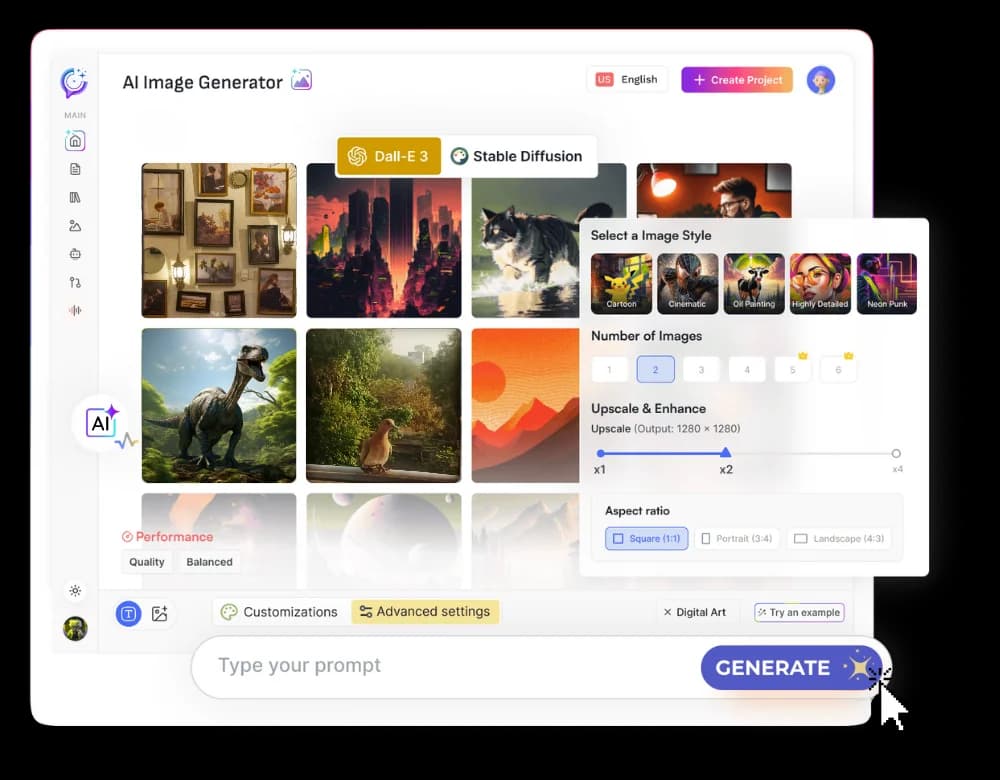
The landscape of AI image generators is rapidly expanding, offering a variety of tools with different strengths. When selecting an AI image tool for your blog content, consider several key factors:
- Ease of Use: For busy bloggers, an intuitive interface is paramount. You want a tool that allows you to generate images quickly without a steep learning curve.
- Output Quality: The images generated should be high resolution, aesthetically pleasing, and align with your desired style. Look for tools that produce clear, detailed, and coherent visuals.
- Customization and Control: The ability to fine-tune your results through prompt engineering and various settings is crucial for achieving specific outcomes.
- Speed: How quickly can you generate images? For content creators on a deadline, faster generation times are a significant advantage.
- Cost: AI image tools vary in their pricing models, from free tiers with limitations to subscription plans. Understanding your budget and usage needs will help you find the most cost-effective solution.
Many platforms offer a suite of AI creative tools. For instance, an all-in-one studio like Textalky provides AI Image tools alongside writing, voiceover, and other creative capabilities, all under a single subscription. This can streamline your workflow and reduce the need for multiple specialized tools. If you're looking to compare options, exploring AI Image Generator: From Prompt to Publish-Ready Visuals can offer further insights. When considering your options, be sure to check Textalky's plans to see how they stack up against your content creation needs.
Mastering the Art of the Prompt
The quality of your AI-generated images hinges almost entirely on the quality of your prompts. Think of a prompt as a detailed instruction manual for the AI. The more specific and descriptive you are, the closer the AI will get to your vision.
Here are actionable tips for crafting effective prompts for blog post images:
- Be Descriptive: Go beyond a simple subject. Describe the scene, the mood, the colors, and the overall aesthetic.
- Instead of: "A laptop."
- Try: "A modern, minimalist laptop on a clean, light-colored wooden desk, bathed in soft, natural morning light. The screen displays a blurred code editor. Focus on a serene and productive atmosphere."
- Specify Style: Do you want a photorealistic image, a watercolor painting, a vector illustration, or a cartoon? Explicitly state the artistic style.
- Example: "A watercolor painting of a cozy cafe interior with warm lighting and patrons reading books."
- Example: "A vibrant, flat design illustration of a diverse team collaborating around a whiteboard."
- Define Composition and Framing: Guide the AI on how the image should be framed. Do you need a close-up, a wide shot, or a specific angle?
- Example: "Close-up, eye-level shot of a steaming cup of coffee on a rustic table, with a blurred background of autumn leaves."
- Example: "Wide-angle view of a futuristic city skyline at dusk, with flying vehicles and neon lights."
- Incorporate Keywords from Your Blog Post: If your post is about "sustainable urban farming," include those terms directly in your prompt. This ensures visual relevance.
- Example: "A rooftop garden in a dense city, showcasing sustainable urban farming techniques with vibrant vegetables and a clear blue sky. Photorealistic."
- Consider Mood and Emotion: What feeling should the image evoke? Use adjectives that convey the desired emotion.
- Example: "A lone hiker reaching a mountain summit, conveying a sense of achievement and awe. Dramatic lighting."
- Example: "Children laughing and playing in a sun-drenched park, evoking joy and innocence. Bright, cheerful colors."
- Experiment with Negative Prompts: Many AI image generators allow you to specify what you don't want in the image. This can help refine results and avoid unwanted elements.
- Example: "A serene forest landscape, --no people, --no buildings"
- Iterate and Refine: Your first prompt might not yield the perfect result. Don't be afraid to tweak your prompt, adjust parameters, and generate variations until you achieve the desired outcome.
Integrating AI Images into Your Blog Workflow
Seamlessly incorporating AI-generated images into your blog post creation process is key to maximizing efficiency. Here’s a practical workflow:
- Ideation and Prompt Creation: As you outline your blog post, identify key concepts or sections that would benefit from a visual. Brainstorm descriptive prompts that align with your content and brand aesthetic.
- Image Generation: Use your chosen AI image generator to create visuals based on your prompts. Generate a few variations to have options.
- Selection and Refinement: Choose the image that best fits your post. You might need minor edits. Many AI image tools offer basic editing capabilities, or you can use external tools. For instance, if you need to refine text within an image or adjust colors, you might use a dedicated image editor.
- Content Creation with AI Writer: If you're generating your blog post content with AI as well, tools like Textalky's AI Writer can help draft your articles, allowing you to focus on the creative elements like visual selection.
- Editing and Optimization: Once you have your chosen image, perform any necessary edits. This could include cropping, resizing, adjusting brightness or contrast, and adding text overlays if needed. Crucially, optimize the image for web use. This involves compressing the file size without significantly sacrificing quality to ensure fast page loading times. Most content management systems have built-in optimization tools or plugins.
- Placement and Alt Text: Insert the image into your blog post at relevant points. Always add descriptive alt text. Alt text is vital for SEO, as it helps search engines understand the image's content, and it provides an accessible description for visually impaired readers.
Ethical Considerations and Best Practices
As AI image generation becomes more prevalent, it's essential to approach its use responsibly.
- Copyright and Licensing: The legal landscape around AI-generated art is still evolving. Generally, many platforms grant users broad usage rights for images generated on their service, often including commercial use. However, it's crucial to review the specific terms of service for the AI image generator you use. Textalky, for example, provides clarity on usage rights within its terms. Avoid generating images that closely mimic copyrighted characters or specific artistic styles that could lead to infringement claims.
- Originality and Authenticity: While AI images are unique in their creation, strive for originality in your prompts and in how you integrate them. The goal is to enhance your content, not to replace genuine human creativity or voice entirely.
- Transparency: Consider whether you need to disclose the use of AI-generated imagery. While not always legally required, some audiences appreciate transparency about how content is created.
- Bias Awareness: AI models are trained on vast datasets, which can sometimes contain biases. Be mindful of the images generated and if they inadvertently perpetuate stereotypes. If you notice problematic outputs, refine your prompts or choose different visuals.
Frequently asked questions
How do I write a good prompt for an AI image generator for my blog?
A good prompt is descriptive, specific, and clear. Include details about the subject, style (e.g., photorealistic, illustration, painting), composition (e.g., close-up, wide shot), mood, and any specific elements you want to include or exclude. Think about the exact scene, lighting, and colors you envision. Iterating and refining your prompts is key to achieving the best results.
Can AI-generated images be used for commercial blog content?
Generally, yes. Most AI image generator services grant users commercial usage rights for the images they create, provided you adhere to their terms of service. Textalky, for instance, allows for commercial use of generated visuals. Always verify the specific terms of service of the platform you are using to ensure compliance.
What are the best AI image generators for bloggers?
The "best" AI image generator depends on your specific needs, such as ease of use, desired output quality, customization options, and budget. Platforms like Midjourney, DALL-E 3 (often accessible via ChatGPT Plus or Microsoft Copilot), and Stable Diffusion offer powerful image generation capabilities. For bloggers looking for an integrated creative solution, an all-in-one platform like Textalky, which combines AI image generation with writing, voiceover, and other tools, is worth considering for its convenience and potential cost savings compared to multiple subscriptions.
Creating compelling blog content involves more than just words. By harnessing the power of AI image generation, you can produce unique, relevant, and engaging visuals that elevate your posts, captivate your audience, and strengthen your brand identity. From mastering the art of the prompt to integrating these visuals seamlessly into your workflow, AI offers a powerful and accessible way to enhance your blog.
If you're looking to streamline your creative process and access a comprehensive suite of AI tools, including a powerful image generator, Textalky is designed to meet those needs. It combines writing, image, voiceover, and video creation under one roof, simplifying your content production.
Ready to transform your blog visuals? Explore Textalky and see how easy it is to create stunning images that bring your content to life.
Sign up today and start generating: https://lab.textalky.app/register
Ready to try it yourself?
Create a free Textalky account - no credit card required - and put this into practice.
Start creating for free