Generate Stunning Product Photos with AI: A Creator's Guide
Elevate your product listings with AI-generated visuals. This guide shows you how to create professional product photos that grab attention and drive sales.
12 min read · September 4, 2026
The Challenge of Product Photography Today
For any online business, compelling product photography is not just a nice-to-have; it's a necessity. High-quality visuals are your virtual storefront, your silent salesperson, and your primary tool for building trust and driving sales. Yet, achieving this standard is a constant battle. Traditional product photography demands significant investment. You might need professional lighting equipment, a dedicated studio space, a high-end camera, and, crucially, the expertise to use them all effectively.
The costs quickly add up: studio rental, equipment purchase or rental, and the fees for a professional photographer can easily run into hundreds or even thousands of dollars per product. Then there’s the time factor. Scheduling shoots, preparing products, taking countless shots, and then editing them all can consume days or weeks, slowing down your time to market.
Even with a budget and time, achieving truly unique and eye-catching images is difficult. In crowded marketplaces like Amazon, Etsy, or your own Shopify store, generic product shots blend in. Customers are bombarded with options, and a bland image is an invitation to scroll past. You need visuals that not only show your product clearly but also tell a story, evoke an emotion, and set you apart from the competition. This is the persistent challenge facing e-commerce sellers and marketers today.
How AI is Revolutionizing Product Visuals
Fortunately, a powerful new ally has emerged: Artificial Intelligence. AI image generation technology has advanced at an astonishing pace, moving beyond generating abstract art to offering practical solutions for businesses. At its core, AI image generation involves using sophisticated algorithms, trained on vast datasets of images and text, to create entirely new visuals from textual descriptions, or "prompts."
For product photography, this translates into a paradigm shift. Instead of physically staging a product, AI can generate photorealistic images of your products in virtually any setting, with any lighting, and from any angle imaginable. This capability democratizes high-quality product visuals. It means you can create stunning, professional-looking images without needing expensive equipment, a studio, or specialized photography skills. AI can produce clean, crisp studio shots, aspirational lifestyle images, or even conceptual visuals that highlight your product’s benefits in unique ways. This technology offers a pathway to not only match but potentially surpass the visual quality previously only accessible to large brands with substantial budgets.
Choosing the Right AI Image Generator for Your Products
The landscape of AI image generators is expanding rapidly, but not all tools are created equal, especially when it comes to the specific demands of product photography. When selecting an AI tool for this purpose, several key features are paramount:
- Control and Precision: Product photography requires a high degree of control. You need to specify the product itself, its materials, colors, and placement. The AI should also allow for precise control over backgrounds, lighting, and camera angles to ensure the product is showcased optimally.
- Realism and Detail: The generated images must be photorealistic. Details like material textures, reflections, and shadows need to be convincing. A tool that can render fine details accurately will produce images that look like they came from a professional photoshoot.
- Consistency: This is perhaps the most critical factor for e-commerce. If you’re photographing multiple products or different views of the same product, you need a consistent style, lighting, and background to maintain brand cohesion and professionalism across your catalog.
- Versatility: The ability to generate different types of shots is also valuable. This includes clean white-background shots, lifestyle images with props and models, and even creative conceptual visuals.
Textalky’s AI Image tool offers a comprehensive solution designed with these needs in mind. It provides users with the power to generate high-quality, realistic product visuals through intuitive prompting. Unlike more general AI art tools, Textalky's offerings are geared towards practical creative output, allowing you to refine your images and achieve the specific look and feel required for e-commerce. For a deeper dive into how AI image generation works from prompt to final output, you might find this guide helpful: AI Image Generator: From Prompt to Publish-Ready Visuals.
Crafting Effective Prompts for Product Photos
The quality of your AI-generated product photos hinges directly on the quality of your prompts. Think of your prompt as a detailed brief for a photographer. The more specific and clear you are, the better the AI can interpret your vision. Here's how to craft effective prompts for product photography:
- Start with the Product: Clearly describe the item you want to feature. Be precise about its type, color, material, and any distinctive features.
- Example: "A sleek, matte black ceramic coffee mug with a minimalist design."
- Define the Setting and Background: Specify the environment. Do you need a clean studio background, a natural setting, or a lifestyle scene?
- For studio shots: "On a clean white seamless background," "Against a soft grey gradient background."
- For lifestyle shots: "On a rustic wooden table with scattered coffee beans," "In a modern kitchen setting."
- Describe the Lighting: Lighting dramatically impacts the mood and realism of a photo.
- Examples: "Soft, natural window light," "Bright studio lighting with subtle shadows," "Dramatic, rim lighting highlighting the edges."
- Specify Camera Angle and Shot Type: Tell the AI how you want the product framed.
- Examples: "Close-up shot," "Eye-level view," "Slightly from above," "Product hero shot," "Three-quarter view."
- Include Style and Mood Keywords: Use adjectives to guide the overall aesthetic.
- Examples: "Photorealistic," "Commercial photography," "Clean and modern," "Warm and inviting," "Luxury product shot."
- Add Negative Prompts (if supported): Many AI tools allow you to specify what you don't want. This can help eliminate common unwanted elements.
- Examples: "No text," "No distracting elements," "Not blurry."
Putting it together:
"Photorealistic, eye-level shot of a sleek, matte black ceramic coffee mug with a minimalist design, placed on a rustic wooden table with a few scattered coffee beans. Soft, natural window light illuminates the scene, casting subtle shadows. Clean and modern aesthetic, commercial product photography. White background, no text."
Experimentation is key. Don't be afraid to try different combinations of keywords and see what results you get.
Workflow: Generating Product Photos with Textalky
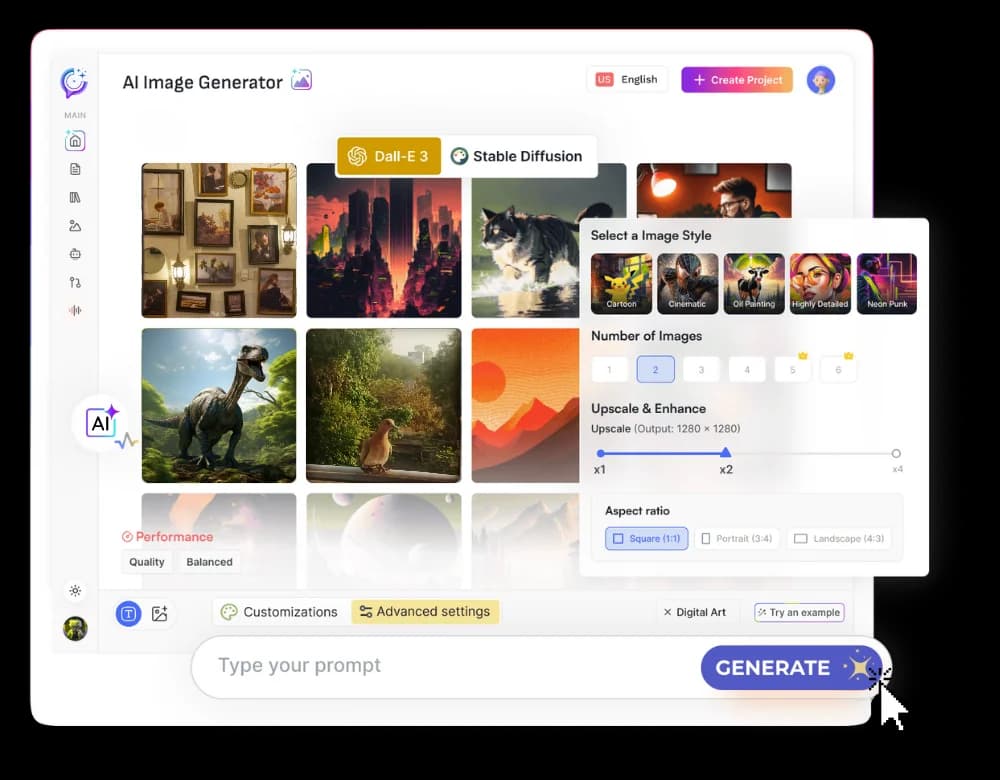
Using Textalky’s AI Image tool, you can streamline your product photography workflow from concept to creation. Here’s a step-by-step process designed for efficiency and quality:
- Access the AI Image Tool: Log in to your Textalky account and navigate to the AI Image creation module.
- Craft Your Initial Prompt: Based on the principles above, write a detailed prompt describing your product, desired setting, lighting, and camera angle. Be as specific as possible. For example, if you’re selling a handcrafted leather wallet: "Photorealistic, close-up studio shot of a vintage brown leather bifold wallet, showing intricate stitching detail. Placed on a dark, textured surface with soft, dramatic lighting from the side. High detail, commercial product photography."
- Generate Initial Images: Input your prompt and let the AI generate a set of initial image options.
- Review and Select: Examine the generated images. Look for those that best capture your product's essence and meet your aesthetic requirements. Pay attention to realism, detail, and how well the product is represented.
- Refine and Iterate: If the initial results aren't perfect, refine your prompt. You might need to adjust lighting descriptions, add more detail about the product’s texture, or change the camera angle. For instance, if the stitching isn't clear enough, you might add "macro detail on stitching" to your prompt.
- Utilize Variations and Upscaling: Once you have a promising image, most AI tools offer options to generate variations of that image or to upscale it to a higher resolution. This is crucial for ensuring your final images are crisp and suitable for e-commerce platforms.
- Background Adjustment (if needed): If your primary goal is a clean white background for product listings, but the AI generated a lifestyle shot, you might use the generated image as a base and then refine the background further. Textalky's integrated tools can help here, or you might use a separate background removal tool if necessary.
- Save and Export: Download your finalized images in the required format and resolution.
This iterative process allows you to guide the AI towards your exact needs, producing professional product photos efficiently.
Beyond Basic Images: Enhancing Product Visuals
High-quality product photos are essential, but the true power of an AI creative studio lies in its ability to enhance your entire product presentation. Textalky offers a suite of tools that go beyond basic image generation, allowing you to create richer, more engaging content for your online store.
- Lifestyle Shots and Context: While the AI Image tool can generate these directly, sometimes you might want to place your product into a specific existing scene or create a more elaborate lifestyle setting. This can involve generating images of your product being used by people. For instance, if you've generated a great image of a smartwatch, you could then use Textalky's capabilities to create images showing it on different wrists in various activities. If you need to create realistic human models for these shots, exploring tools that can generate AI Avatars can be a powerful next step.
- Background Removal and Replacement: Often, you’ll want a consistent background, like pure white or a subtle gradient, for product listings. If your AI-generated image includes a background that isn’t quite right, or if you have existing photos that need a cleaner look, AI-powered background removal tools can isolate your product instantly.
- Product Variations: Need to showcase your product in multiple colors or configurations? Instead of reshooting, you can prompt the AI to generate variations of your product with different color schemes or subtle design changes, ensuring a cohesive look across all your product options.
- Video Content: Static images are powerful, but dynamic video can be even more persuasive. Textalky’s AI video tools can help you create short promotional videos, animated product showcases, or even explainer videos that bring your product to life. Imagine an animated GIF of your product rotating, or a short video demonstrating its key features.
- AI Music and Sound: For any video content you create, or even for background ambiance on your website, AI music generation can provide custom soundtracks that perfectly match your brand’s mood and message.
By integrating these various AI capabilities, you can build a comprehensive visual strategy that captivates customers and drives engagement far beyond what single-purpose tools could achieve.
The Cost-Effectiveness of AI Product Photography
When comparing AI-generated product photography to traditional methods, the cost and time savings are substantial.
Traditional Photography:
- High Upfront Costs: Professional equipment, studio rental, photographer fees can easily amount to hundreds or thousands of dollars per product line.
- Time Intensive: Scheduling, shooting, and editing can take days or weeks, delaying product launches and marketing campaigns.
- Limited Iterations: Making significant changes after a shoot can be prohibitively expensive, forcing compromises.
AI-Generated Photography:
- Minimal Investment: With Textalky, the primary cost is the subscription to the platform. The AI Free plan offers a starting point, while paid plans like AI Basic ($6 per month) or AI Explorer ($12 per month) provide significantly more resources. For a truly comprehensive solution, the AI Lifetime Pro deal offers lifetime access for a one-time $79 payment, providing access to all tools and substantial monthly quotas.
- Rapid Turnaround: You can generate multiple image concepts and variations in minutes or hours, not days or weeks. This dramatically speeds up your workflow and allows for quicker market testing.
- Unlimited Iterations: If an image isn't perfect, you can tweak your prompt and regenerate it at no extra cost. This allows for endless refinement and experimentation to achieve the ideal visual.
Furthermore, the problem of managing multiple subscriptions for different creative tasks - one for writing, another for images, another for voiceovers, and so on - is a common drain on resources and productivity. Textalky’s value proposition as an all-in-one AI creative studio is particularly compelling here. Instead of paying for separate tools, you get everything integrated into a single interface under one subscription. This simplifies your operations and consolidates your creative power. For a detailed look at how this stacks up against managing multiple tools, consider this comparison: AI vs Traditional Content Creation: Cost and Time Comparison and all-in-one AI studio vs stacking tools.
The financial and temporal advantages make AI-generated product photography an incredibly cost-effective solution, especially for small to medium-sized businesses, startups, and individual creators looking to compete with larger, more established brands.
Making the Switch: Your Next Steps
The transition to AI-powered product photography is more accessible than ever. You no longer need to be a tech expert or have a massive budget to create stunning visuals that drive sales. The key is to start experimenting and see how these tools can transform your e-commerce presence.
To begin, explore the capabilities of Textalky’s integrated creative suite. You can start with the AI Free plan to get a feel for the platform, generating up to 5,000 words, 5,000 voice characters, and 10 visual credits per month. This allows you to test the AI Image tool and understand the prompt engineering process without any financial commitment.
If you’re ready to invest in higher quality and more extensive usage, Textalky offers several affordable paid plans. You can review the full details on the plans and pricing page.
However, for creators and businesses looking for the most comprehensive and cost-effective long-term solution, Textalky currently features an exceptional offer: AI Lifetime Pro, lifetime access for $79 once. This one-time payment unlocks all the tools within the studio, including the powerful AI Image generator, along with substantial monthly quotas that reset every month. It’s a final-sale, non-refundable offer once the account has been used, but it provides unparalleled value for anyone serious about leveraging AI for their creative needs. Learn more about this significant opportunity by visiting the AI Lifetime Pro deal page.
By embracing AI for your product photography, you’re not just saving money and time; you’re gaining a competitive edge, enabling you to create more compelling, consistent, and professional visuals that will capture customer attention and boost your sales. Take the first step today and redefine your product presentation.
Frequently asked questions
Can AI truly replace professional product photographers?
AI can significantly augment and, in many cases, replace the need for traditional professional product photographers, especially for e-commerce businesses focused on consistent catalog imagery. AI tools can generate photorealistic images with precise control over lighting, angles, and backgrounds, often at a fraction of the cost and time. However, for highly artistic conceptual shoots, unique brand storytelling, or complex commercial campaigns requiring a specific human touch and directorial vision, a skilled human photographer might still offer advantages. For most online sellers, AI provides a powerful, cost-effective solution for high-volume, quality product visuals.
What are the best AI tools for generating product photos?
When selecting AI tools for product photography, prioritize features like realism, detail control, consistency, and prompt flexibility. Textalky's AI Image tool is a strong contender because it's part of an integrated suite designed for practical creative output. It allows for detailed prompting and iterative refinement, making it suitable for generating clean studio shots and lifestyle images. Other general AI image generators can also be used, but often require more effort to achieve consistent, product-focused results.
How can I ensure consistency in AI-generated product images?
Consistency in AI-generated product images is achieved through meticulous prompt engineering and iterative refinement. Use specific keywords to describe the product, its materials, colors, and any unique features. Define the lighting, camera angle, and background precisely in every prompt. Maintain a consistent style or aesthetic by using the same descriptive terms across different product generations. If your tool allows, use features like image-to-image generation or seed numbers to help the AI maintain visual coherence. Textalky's approach to an all-in-one studio also helps by keeping your entire creative process within one system, simplifying style management.
Ready to try it yourself?
Create a free Textalky account - no credit card required - and put this into practice.
Start creating for free