The Best Text to Speech Software for Realistic AI Voices
Find the best text to speech software to generate natural-sounding AI voices for your projects. Explore features, quality, and cost-effectiveness.
9 min read · September 4, 2026
The Best Text to Speech Software for Realistic AI Voices
Finding text to speech software that produces natural, human-like voices can be challenging. Many options sound robotic, lack emotional nuance, or are prohibitively expensive, hindering the creation of engaging content. If you’re a content creator, marketer, educator, audiobook producer, or business owner looking to add compelling narration to your projects, you know the struggle. You need voices that capture attention, convey emotion, and maintain a professional tone, not just robotic monotone readings.
Why Realistic AI Voices Matter
In today's crowded digital space, audio content is more important than ever. Whether it's for explainer videos, e-learning modules, podcast intros, or marketing materials, the voice delivering the message significantly impacts its reception. A robotic, unnatural voice can quickly disengage an audience, making the content feel less credible and the brand seem unprofessional.
Realistic AI voices, on the other hand, offer a powerful solution. They can:
- Enhance Engagement: Natural-sounding voices are more pleasant to listen to, keeping audiences hooked for longer. This is crucial for retaining viewers on platforms like YouTube or listeners in online courses.
- Boost Professionalism: High-quality narration signals a commitment to quality and attention to detail, elevating your brand's perception.
- Improve Accessibility: AI-generated speech makes content accessible to a wider audience, including those with visual impairments or who prefer auditory learning.
- Scale Content Production: Generating voiceovers with AI is significantly faster and more cost-effective than hiring human voice actors, allowing for rapid content creation.
For a deeper dive into the nuances of AI-powered voice generation, explore resources like AI Text to Speech: The Complete Guide for Creators. The ability to produce a voice that resonates with listeners is no longer a luxury but a necessity for impactful communication.
Key Features to Look For in Text to Speech Software
When evaluating text to speech software, several key features determine the quality and usability of the AI voices. Focusing on these will help you find a tool that meets your specific needs.
- Voice Quality and Realism: This is paramount. Listen to voice samples. Do they sound like a real person speaking, or do they have that telltale robotic cadence? Look for software that uses advanced AI models to produce voices with natural intonation, breathing sounds, and subtle emotional inflections.
- Language and Accent Variety: If your content targets a global audience or requires specific regional dialects, a wide selection of languages and accents is essential. More sophisticated tools offer a broad range of options, catering to diverse projects.
- Emotional Tone Control: Beyond basic pronunciation, the ability to control the emotional tone of the AI voice is a significant differentiator. Can you adjust the voice to sound happy, sad, excited, or authoritative? This level of control allows for more dynamic and engaging narration.
- Pronunciation Accuracy and Customization: The software should accurately pronounce words, including proper nouns, technical terms, and acronyms. The best tools allow for custom pronunciations, ensuring that specific words are always voiced correctly. This can often be achieved through SSML (Speech Synthesis Markup Language) tags, which offer granular control over speech output.
- Speed and Pitch Adjustment: Flexibility in adjusting speech rate and pitch allows you to fine-tune the narration to match the content's pacing and the desired vocal character.
- Ease of Use: A user-friendly interface is crucial, especially for those new to AI voice generation. The workflow should be intuitive, allowing you to input text, select a voice, customize settings, and generate audio quickly.
- Voice Cloning Capabilities: For a truly branded experience, some advanced software offers AI voice cloning. This allows you to create a unique AI voice based on your own recordings, ensuring consistent brand identity across all audio content. If this is of interest, you might explore guides on AI Voice Cloning.
- Output Formats: Ensure the software supports common audio formats like MP3 or WAV for easy integration into your projects.
Top Text to Speech Software Options for Realistic Narration
Navigating the landscape of text to speech software can be overwhelming. Here, we highlight a leading option that excels in producing realistic, nuanced AI voices, offering a comprehensive suite of tools for creators.
Textalky
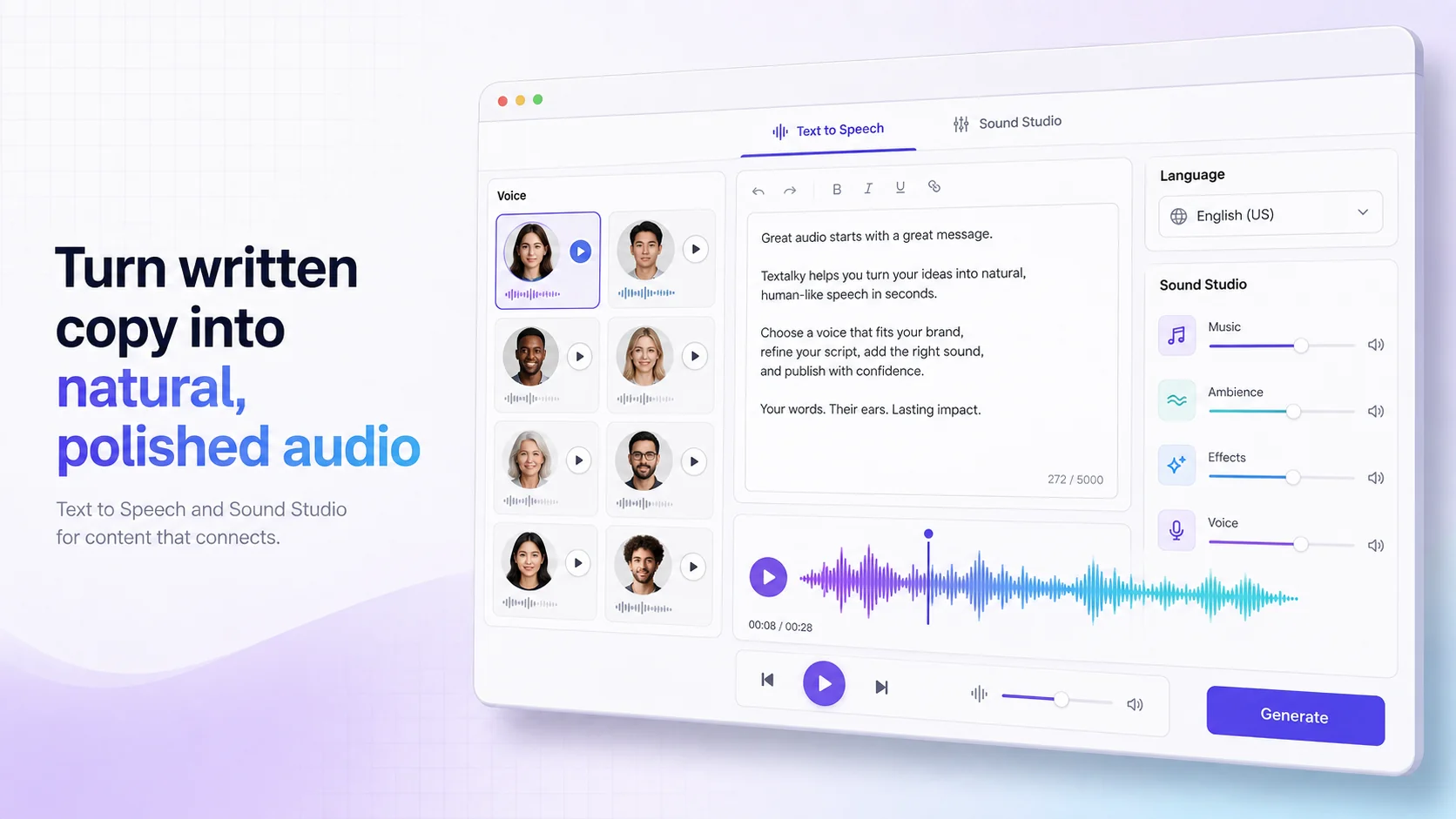
Textalky stands out as an all-in-one AI creative studio, consolidating numerous AI-powered tools, including a robust text to speech engine, under a single subscription. This approach eliminates the need for multiple specialized software packages, streamlining your workflow and reducing costs.
The platform offers impressive AI Voiceover capabilities, powered by a variety of models from leading providers like OpenAI, Azure, AWS, and Google Cloud, alongside specialized voice technology from ElevenLabs. This diverse foundation allows Textalky to provide over 50 studio-grade voices in more than 150 languages and accents.
What sets Textalky apart is the quality and naturalness of its AI voices. They go beyond basic text-to-speech, incorporating subtle emotional cues and intonation that make the narration sound remarkably human. This makes it an excellent choice for content creators who need engaging and professional voiceovers for videos, e-learning, audiobooks, and marketing campaigns.
Beyond voice generation, Textalky integrates AI writing tools, image and video creation, chatbot development, and code generation, making it a comprehensive solution for a wide range of creative needs. This holistic approach means you can generate your script, create the voiceover, and even produce accompanying visuals all within one platform.
When considering Textalky, explore their offerings to see how their AI voice capabilities can elevate your projects. The platform is designed to be accessible, with a free plan for trying out features and various paid tiers to suit different usage levels.
Comparing Text to Speech Solutions: Quality vs. Cost
The decision of which text to speech software to adopt often boils down to balancing voice quality, feature set, and cost. It's a common trade-off: the most realistic and feature-rich options often come with a higher price tag, while cheaper alternatives might compromise on naturalness or essential functionalities.
Many standalone text to speech tools exist, each with its own monthly subscription fee. These costs can quickly add up, especially if you require multiple specialized tools for writing, voice generation, image creation, and more. This is where an all-in-one solution like Textalky offers significant value. Instead of paying separately for each service, you get access to over 20 AI tools, including advanced text to speech, under one subscription.
When exploring pricing, it’s important to look at both monthly and annual options. While monthly plans offer flexibility, committing to an annual subscription often provides substantial savings. For example, Textalky offers various plans, with the AI Plus plan saving users money when billed annually compared to its month-to-month rate. You can review all plans and current pricing on their website.
For those seeking the ultimate value, Textalky currently features a compelling AI Lifetime Pro, lifetime access for $79 once offer. This one-time payment provides access to the full suite of tools, including all the advanced AI voice features, with generous monthly quotas that reset each month. This deal represents a significant departure from recurring subscription models and can offer exceptional long-term savings, especially for active creators. It's important to note that this is a final sale and non-refundable once the account has been used.
When comparing, always consider your projected usage. Do you need basic narration for occasional videos, or are you producing professional audiobooks or extensive e-learning courses? Matching the software's capabilities and pricing structure to your specific needs will ensure you get the best value for your investment. Don't be swayed solely by the lowest price; the quality of the voice and the range of features will ultimately determine the success of your audio content.
Integrating Text to Speech into Your Workflow
Incorporating text to speech software into your existing creative process can significantly boost efficiency and output quality. Here are practical ways to leverage these tools for various projects:
- Video Narration: Generate voiceovers for YouTube videos, marketing explainers, or social media content. Input your script directly into the text to speech software, select a voice that matches your brand's tone, and export the audio file. This audio can then be synced with your video footage. For example, Textalky offers tools to help accelerate your YouTube channel creation, including narration.
- E-Learning and Online Courses: Create engaging and accessible educational materials. AI voices can narrate course modules, tutorials, and presentations, making them suitable for learners who prefer auditory input or need to multitask. Textalky's solutions for narrated course and training content can be particularly beneficial here.
- Audiobook Production: For indie authors or those on a budget, text to speech software can be a viable option for producing audiobooks. While the nuances of human performance are hard to replicate entirely, modern AI voices offer a quality that is often sufficient for many genres. You can even use Textalky's capabilities for podcast scripting, narration and mastering, which shares many similarities with audiobook creation.
- Marketing and Advertising: Quickly create voiceovers for radio ads, promotional videos, or app notifications. The speed of AI generation allows for rapid iteration and A/B testing of different voiceovers.
- Accessibility Features: Add audio descriptions to websites, apps, or presentations to make them accessible to visually impaired users.
- Prototyping and Storyboarding: Use AI voices to quickly get audio feedback on scripts or dialogue during the early stages of a project, before committing to professional voice actors.
To get started, begin by experimenting with a free trial or a basic plan. Input a short script and try out different voices and settings. Once you find a workflow that suits you, consider upgrading to a plan that offers the features and quotas you need for your regular projects.
Frequently asked questions
What makes an AI voice sound realistic?
An AI voice sounds realistic when it successfully mimics the natural characteristics of human speech. This includes:
- Intonation and Prosody: The rise and fall of the voice, the rhythm of speech, and the stress placed on certain words, all of which convey meaning and emotion.
- Natural Pauses and Breathing: Humans naturally pause to breathe or collect their thoughts. Realistic AI voices incorporate these subtle breaks.
- Emotional Nuance: The ability to convey emotions like happiness, sadness, excitement, or authority through vocal tone.
- Clarity and Articulation: Clear pronunciation of words and sounds, without sounding overly precise or robotic.
- Absence of Artifacts: Minimal unnatural clicking, hissing, or metallic sounds that can betray the artificial origin of the voice.
Advanced AI models, trained on vast datasets of human speech, are crucial for achieving these qualities.
Can I use text to speech software for commercial projects?
Yes, most reputable text to speech software providers allow commercial use of the generated audio, but it's essential to check the specific licensing terms of the software you choose. Many platforms offer different plans with varying usage rights. For instance, Textalky's paid plans generally permit commercial use of the generated audio. Always review the terms of service to ensure compliance, especially regarding redistribution or use in broadcast advertising.
What is the best text to speech software for audiobooks?
The "best" text to speech software for audiobooks depends on your priorities. If budget and speed are key, advanced AI voice generators like Textalky can produce high-quality narration that is often suitable for many audiobook genres, especially with their extensive voice library and customization options. For those seeking the absolute highest fidelity and performance nuances, hiring a professional human narrator might still be the gold standard. However, for creators looking for a cost-effective and efficient solution that delivers a natural-sounding voice, Textalky's AI voiceover capabilities are a strong contender, offering a balance of realism, features, and value.
To begin creating compelling, human-like narration for your projects, explore the capabilities of advanced AI voice generation. For an exceptional value proposition, consider the AI Lifetime Pro deal which offers lifetime access to a comprehensive suite of AI creative tools, including studio-quality text to speech, for a single one-time payment. It's an ideal way to equip yourself with powerful narration capabilities without ongoing subscription costs.
Ready to try it yourself?
Create a free Textalky account - no credit card required - and put this into practice.
Start creating for free