Generate Images from Text: A Step-by-Step Guide for Creators
Turn your words into captivating visuals. This guide walks you through using AI to generate images from text, perfect for any creative project.
8 min read · September 4, 2026
You need to create unique visuals to make your content stand out, but traditional design or photography is too time-consuming, expensive, or requires skills you don't have. This barrier prevents your ideas from being seen and understood as clearly as they could be, leaving your content feeling flat and less engaging.
What Are AI Generated Images from Text?
AI generated images from text are digital visuals created by artificial intelligence algorithms based on a written description, or "prompt." You provide the AI with a textual command, and it interprets that command to generate a completely new image. This technology has rapidly evolved, transforming how creators can bring their concepts to life.
At its core, text-to-image AI works by analyzing vast datasets of images paired with their corresponding text descriptions. Through complex neural networks, the AI learns to associate specific words, phrases, and concepts with visual elements, styles, and compositions. When you input a prompt, the AI draws upon this learned knowledge to construct an image that matches your description.
The importance of these tools for content creation cannot be overstated. In an era where visual appeal is paramount for capturing attention across social media, blogs, and marketing materials, the ability to quickly generate custom imagery is invaluable. It democratizes visual creation, empowering individuals and small teams to produce professional-looking graphics without needing extensive design expertise or a large budget.
The Power of a Good Prompt
The quality of the AI-generated image is directly tied to the quality of the prompt you provide. Think of yourself as a director guiding an incredibly talented but literal-minded artist. The more precise and descriptive your instructions, the closer the final output will be to your vision.
Crafting effective prompts involves several key elements:
- Subject: Clearly define the main focus of your image. Be specific. Instead of "a dog," try "a golden retriever wearing a party hat."
- Style: Specify the artistic style you're aiming for. This could be "photorealistic," "watercolor painting," "cyberpunk illustration," "art deco poster," "pencil sketch," or "anime style."
- Composition and Framing: Describe how the subject should be positioned. Examples include "close-up portrait," "wide-angle landscape," "overhead shot," "from a low angle," or "centered."
- Mood and Atmosphere: Convey the feeling you want the image to evoke. Use descriptive words like "serene," "chaotic," "joyful," "mysterious," "nostalgic," or "vibrant."
- Lighting: Detail the lighting conditions. "Golden hour sunlight," "dramatic studio lighting," "neon glow," or "moonlit night" can significantly alter the image's feel.
- Details and Context: Add specific elements to enrich the scene. For example, "a cozy cafe with steam rising from a coffee cup," or "a futuristic city skyline at dusk with flying cars."
Experimentation is crucial. Don't be afraid to combine elements in unexpected ways. For instance, "a majestic lion wearing a crown, depicted in a Van Gogh style, with a stormy sky in the background."
Choosing the Right AI Image Tool
The landscape of AI image generators is growing rapidly, with many tools offering similar core functionalities. While many individual tools focus solely on image generation, an integrated approach can streamline your entire creative process.
For creators juggling multiple content needs - writing, voiceovers, video, and visuals - managing separate subscriptions for each tool can become complex and costly. An all-in-one platform like Textalky offers a significant advantage. Instead of hopping between different applications for different tasks, you have a unified interface where all your AI creative tools reside under a single subscription. This means you can seamlessly generate text, then use that text to create images, and even move on to video or voiceovers without leaving the studio.
When evaluating AI image generators, consider how well they fit into your broader workflow. Textalky's AI Image tool is part of a comprehensive suite that includes an AI Writer, AI Video tools, and more, allowing for a cohesive content creation pipeline. This integration means you can, for example, use the AI Writer to draft a blog post and then immediately generate relevant illustrations for it. For a deeper dive into how these tools work, you might find a guide like AI Image Generator: From Prompt to Publish-Ready Visuals helpful.
Choosing the right platform often comes down to balancing features, ease of use, and cost. Textalky offers a range of all plans and current pricing to suit different needs. For creators looking for comprehensive access to all tools, including advanced AI features, for a one-time payment, the AI Lifetime Pro, lifetime access for $79 once is a standout offer. This allows you to access the entire studio, including the AI Image generator, without ongoing subscription fees.
Step-by-Step: Creating Your First AI Image
Let's walk through the practical process of generating an image using an AI tool. While the specific interface may vary slightly between platforms, the fundamental steps are consistent.
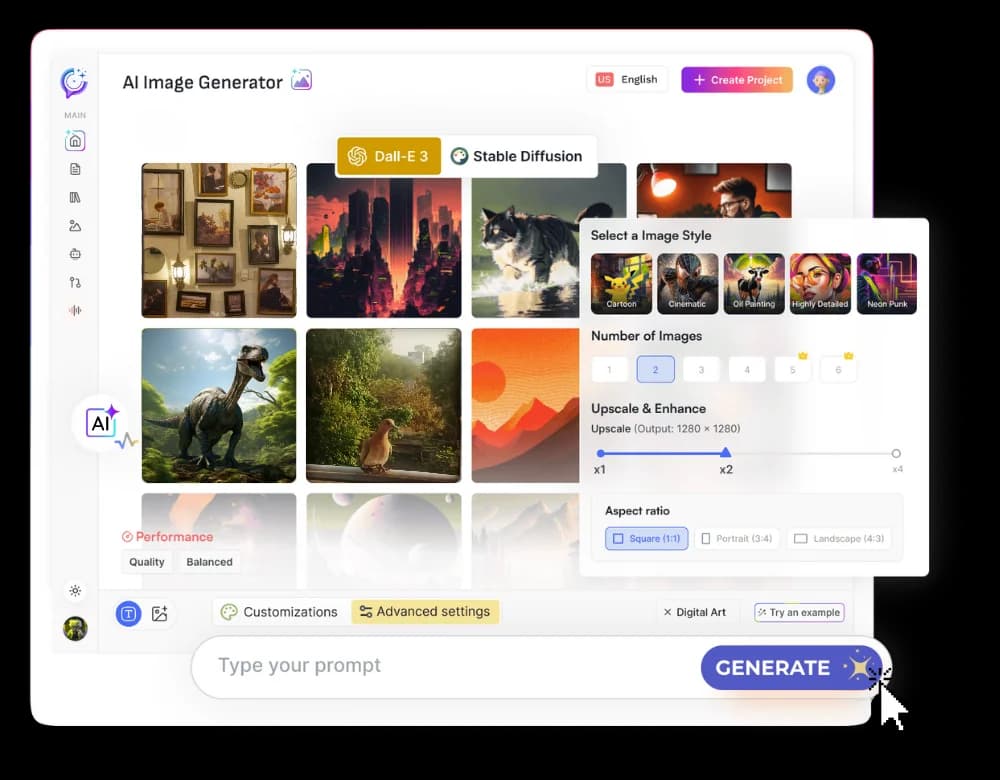
- Access the AI Image Tool: Log in to your chosen AI creative studio. Navigate to the AI Image generation section.
- Enter Your Prompt: In the designated text field, type your descriptive prompt. Be as detailed as possible, incorporating the elements discussed earlier: subject, style, mood, composition, and specific details.
- Example Prompt: "A whimsical illustration of a fox wearing spectacles reading a book under a glowing mushroom, in a storybook art style, soft lighting."
- Generate Options: Once you've entered your prompt, initiate the generation process. The AI will take a few moments to process your request and produce several image variations.
- Review and Select: Examine the generated images. Look for the one that best matches your vision. Consider which one has the most compelling composition, style, and details.
- Refine and Iterate (if needed): If none of the initial results are quite right, you have options:
- Edit the Prompt: Tweak your original prompt. Add more detail, change the style, or clarify ambiguous terms. For instance, you might add "with fireflies illuminating the scene" or change "storybook art style" to "children's book illustration."
- Generate Variations: Many tools allow you to select an image you like and generate variations based on it, keeping its core elements while exploring slight differences.
- Use Negative Prompts: If certain unwanted elements keep appearing, use a negative prompt. For example, if you don't want text in the image, you might add "no text, no words" to your negative prompt field.
- Download: Once you're satisfied with an image, download it in your desired resolution and format.
Beyond Basic Images: Advanced Techniques and Styles
Once you've mastered the basics, you can explore more advanced techniques to achieve highly specific artistic outcomes.
- Achieving Specific Artistic Styles: To replicate a particular artist's style, you can often include their name in the prompt, e.g., "a portrait of a robot in the style of Frida Kahlo." Similarly, specifying movements like "Impressionism," "Surrealism," or "Bauhaus" can guide the AI's output.
- Controlling Composition: Beyond basic framing, you can influence camera angles ("Dutch angle," "fisheye lens"), depth of field ("shallow depth of field," "bokeh"), and even the scene's perspective.
- Using Negative Prompts Effectively: Negative prompts are powerful for exclusion. If you're generating an image of a forest and keep getting people in it, add "people, humans, figures" to your negative prompt. This helps the AI avoid generating elements you don't want.
- Iterative Generation: Don't settle for the first set of results. Use the generated images as a starting point. You can often re-prompt based on a specific image you like, or use an image generation tool that allows for inpainting or outpainting (editing specific parts of an image or extending its canvas).
- Prompt Weighting: Some advanced tools allow you to assign weights to different parts of your prompt, giving more or less importance to certain keywords. This level of control can fine-tune the output precisely.
Experimentation is key here. Combine styles, moods, and subjects in ways that push the boundaries of what you thought was possible.
Integrating AI Images into Your Workflow
The true power of AI image generation, especially within an all-in-one studio, lies in its integration into a broader content creation workflow.
- Blog Posts and Articles: Enhance your written content with custom illustrations that directly complement the text. Using Textalky's AI Writer to draft your article and then its AI Image tool to create visuals means you can produce a complete piece of content efficiently.
- Social Media Content: Generate eye-catching graphics for posts, stories, and ads. Quick turnaround times are essential on social media, and AI image generation excels here.
- Marketing Materials: Create unique visuals for brochures, flyers, presentations, and website banners without relying on stock photos or expensive graphic designers.
- Video Production: AI-generated images can serve as static backgrounds, elements within animations, or inspiration for video concepts. Textalky's AI Video capabilities can further leverage these visuals. For content creators focused on platforms like YouTube, generated images are perfect for creating compelling YouTube thumbnails.
- Concept Art and Storyboarding: Quickly visualize ideas for larger projects, from character designs to scene layouts, saving significant time in the early stages of production.
By having these tools within a single platform, you eliminate the friction of transferring files and switching between applications. This interconnectedness allows for a more fluid and productive creative process.
Frequently asked questions
How do I write a good prompt for AI image generation?
A good prompt is detailed and specific. It clearly defines the subject, desired style (e.g., photorealistic, watercolor, cyberpunk), mood (e.g., joyful, mysterious), composition (e.g., close-up, wide shot), and any specific details like lighting or background elements. Experiment with combining these aspects.
What is the difference between Textalky's AI Image tool and other generators?
Textalky offers an integrated AI creative studio, meaning its AI Image tool is part of a larger suite that includes AI writing, voice, video, and more, all under one subscription. This allows for seamless workflow integration, unlike standalone image generators where you would need to manage separate tools and subscriptions for other content creation needs.
Can I use AI-generated images for commercial purposes?
Generally, yes, AI-generated images can be used for commercial purposes, but it's crucial to review the specific terms of service for the AI tool you are using. Textalky's terms cover commercial use, but for any AI-generated content, always ensure you understand the licensing and usage rights provided by the platform.
Ready to Create Stunning Visuals?
The ability to transform words into compelling images is no longer a futuristic concept; it's a practical tool available to every creator today. By understanding how to craft effective prompts and utilizing an integrated creative studio, you can overcome visual creation hurdles and elevate your content.
For those looking for a comprehensive solution that combines AI writing, image generation, and much more, Textalky offers an unparalleled value. You can explore all the features and all plans and current pricing to find the best fit for your needs.
To experience the full power of an all-in-one AI creative studio, consider the AI Lifetime Pro deal. This offer provides lifetime access to a vast array of AI tools, including the advanced AI Image generator, for a single one-time payment, allowing you to create without limits for years to come.
Ready to try it yourself?
Create a free Textalky account - no credit card required - and put this into practice.
Start creating for free