Create Engaging YouTube Videos with AI Text to Speech
Transform your YouTube videos with AI text to speech. This guide shows you how to create compelling narration and find the perfect voice to engage your audience and grow your channel.
11 min read · September 4, 2026
YouTube creators often face a common hurdle: producing consistent, high-quality narration. Whether it's a lack of confidence in one's own voice, the relentless pressure of a busy schedule, or the significant expense of hiring professional voice actors, achieving compelling audio for your videos can be a major challenge. This is where AI text to speech (TTS) emerges as a powerful solution, offering a way to add engaging narration that fits both your content and your budget.
This article dives into how AI text to speech can specifically transform your YouTube video production, addressing the unique needs of creators and enhancing the appeal of your content. We'll explore how to select the perfect AI voice, seamlessly integrate TTS into your workflow, and even leverage other AI audio tools to create a richer listening experience.
Why YouTube Creators Need AI Text to Speech
The journey of a YouTube creator is often a solitary one, filled with the demands of scripting, filming, editing, and promoting. Amidst these tasks, consistently delivering engaging audio narration can feel like an uphill battle. AI text to speech offers a compelling alternative that directly tackles these pain points.
One of the most significant benefits is overcoming voice shyness or perceived vocal limitations. Many creators are hesitant to use their own voice, fearing it's not polished enough, too monotonous, or simply not the right fit for their brand. AI TTS provides a solution by allowing you to generate professional-sounding narration from text, eliminating the need to record your own voice. This opens up creative possibilities for those who prefer to focus on other aspects of production or who simply feel more comfortable behind the scenes.
Time is another precious commodity for YouTube creators. Recording, re-recording, and perfecting voiceovers can consume hours that could otherwise be spent on content creation or channel growth. AI TTS dramatically accelerates this process. You can input your script, choose a voice, and generate high-quality audio in minutes. This efficiency allows for quicker turnaround times on videos, enabling you to publish more consistently and keep your audience engaged.
The cost of professional voice talent can also be a significant barrier, especially for emerging creators or those operating on a tight budget. Hiring experienced voice actors can range from hundreds to thousands of dollars per project, a price point that is often unsustainable. AI TTS offers a fraction of the cost, providing access to a wide array of high-quality voices for a nominal fee or even as part of a subscription. This democratization of professional audio production empowers creators to elevate their content without breaking the bank.
Furthermore, AI TTS tools offer unparalleled consistency. Once you've found a voice that aligns with your channel's persona, you can rely on it to deliver every narration with the same tone, quality, and pronunciation. This uniformity builds brand recognition and creates a predictable, professional listening experience for your audience. For a deeper dive into the capabilities of AI TTS, you can explore resources like AI Text to Speech: The Complete Guide for Creators. The ability to generate clear, articulate speech using AI Voiceover is a fundamental advantage that makes AI TTS an indispensable tool for any serious YouTube creator.
Choosing the Right AI Voice for Your YouTube Channel
Selecting the perfect AI voice is crucial for maintaining your channel's identity and connecting with your audience. The right voice can enhance your content's impact, while the wrong one can feel jarring or unprofessional. Think of the AI voice as another character in your YouTube production.
Consider your channel's niche and target audience. A gaming channel might benefit from an energetic, youthful voice, while a finance channel might require a more authoritative and measured tone. A documentary-style channel could opt for a calm, narrative voice, whereas a comedy channel might experiment with more expressive or quirky options.
Tone and Emotion: Modern AI TTS engines offer a surprising range of emotional expression. Look for voices that can convey enthusiasm, seriousness, curiosity, or empathy as needed for your script. Experiment with different voices to see which one best captures the intended feeling of your content. Some voices are naturally suited to a particular emotion, while others allow for adjustments to achieve the desired effect.
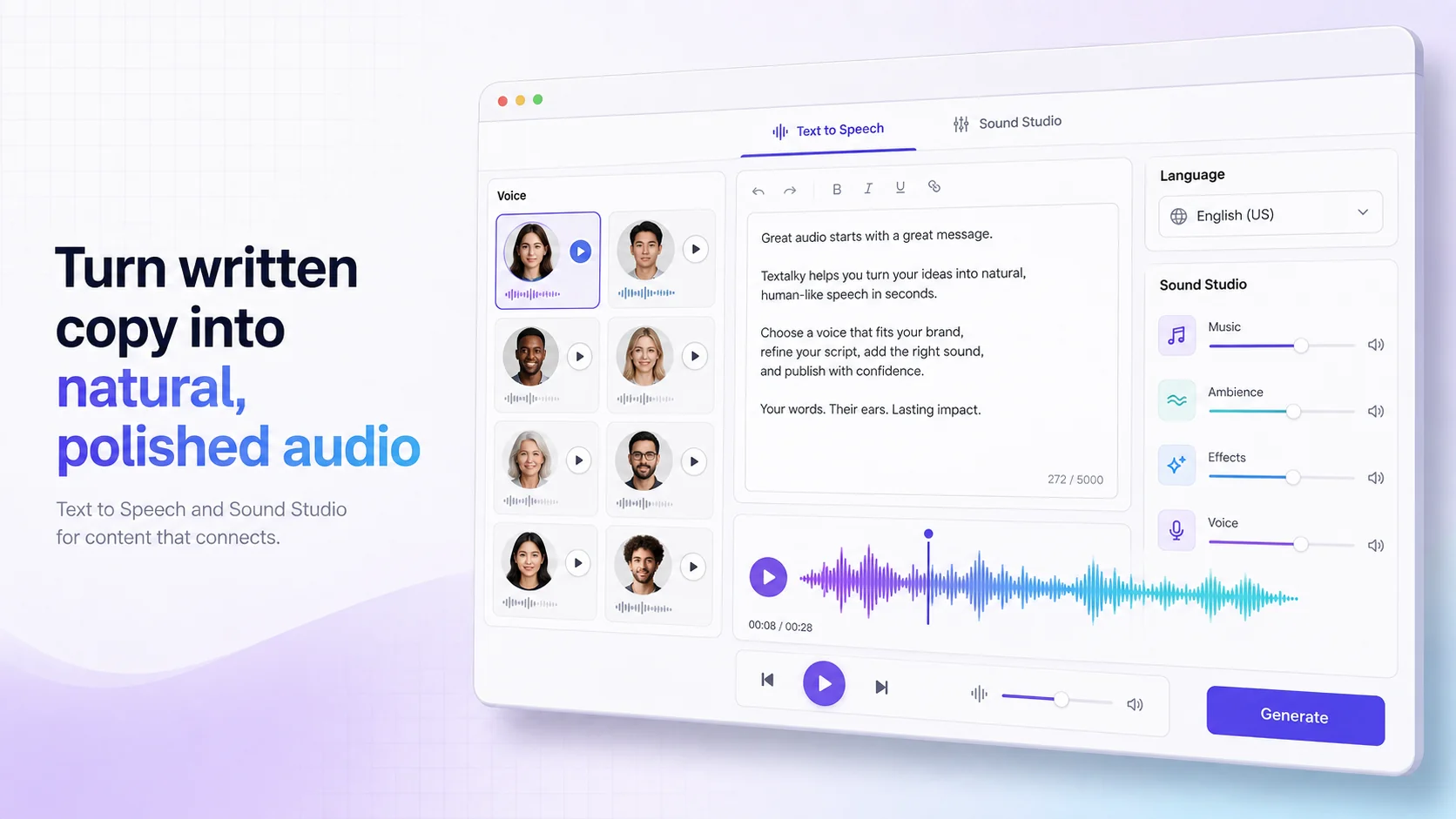
Accent and Language: With over 150 languages and accents available, you have a global palette to choose from. Consider where your primary audience is located. While a standard American or British accent is often a safe bet, using a voice with an accent that resonates with your audience can create a stronger connection. If your content is educational and targets a specific linguistic group, choosing a voice in that language and accent is essential. Textalky offers over 50 studio-grade voices, providing a broad selection to meet diverse needs.
Brand Alignment: Your channel's brand is more than just its visuals; it's also its sonic identity. Does the voice sound friendly and approachable, or formal and expert? Does it align with the overall personality you want to project? Consistency is key. Once you find a voice that works, try to stick with it for all your narrations to build brand recognition.
Clarity and Pronunciation: The primary function of TTS is clear communication. Ensure the chosen voice pronounces words correctly, especially names, technical terms, or jargon specific to your niche. Listen to samples of the voice reading various types of sentences to gauge its overall clarity and accuracy.
When exploring options, listen to multiple samples from different AI providers. Many platforms offer free trials or limited free tiers, allowing you to test voices before committing. Pay attention to how the voice sounds when reading different types of content, from quick introductions to longer, more complex explanations.
Integrating AI Text to Speech into Your YouTube Workflow
Getting AI-generated narration into your YouTube videos is a straightforward process, but it requires a few key steps to ensure smooth integration into your existing video editing workflow.
1. Scripting and Text Generation: Start with a well-written script. This is the foundation of your video's audio. Once your script is finalized, you'll input it into the AI TTS tool. Many platforms, like Textalky, offer AI writing assistants that can help you draft or refine your scripts, ensuring they are clear, concise, and engaging.
2. Voice Selection and Audio Generation: Choose your preferred AI voice from the available options, considering the factors discussed earlier. Most AI TTS tools allow you to adjust speech parameters such as speed, pitch, and volume. Experiment with these settings to find the optimal audio output. Once you're satisfied, generate the audio file. This is typically provided in common formats like MP3 or WAV.
3. Editing the AI Audio: While AI-generated audio is often excellent straight out of the box, some minor editing might be beneficial. You might need to:
- Trim Silence: Remove any unnecessary pauses at the beginning or end of generated segments.
- Adjust Pacing: If the AI reads too fast or too slow in certain parts, you can sometimes adjust this within the TTS tool or by slightly speeding up or slowing down segments in your video editor.
- Add Emphasis: For critical points, you might want to slightly adjust the volume or speed of specific words or phrases.
- Remove Artifacts: Though rare with advanced AI, occasional glitches can occur. A good audio editor can help clean these up.
4. Incorporating into Video Editing Software: Import the generated audio file into your preferred video editing software (e.g., Adobe Premiere Pro, Final Cut Pro, DaVinci Resolve, or even simpler tools like iMovie or CapCut).
- Synchronization: Align the audio track with your video footage. Ensure the narration syncs perfectly with any on-screen actions or visuals.
- Layering with Music and Sound Effects: This is where the audio truly comes alive. Overlay background music, sound effects, and other audio elements to create a dynamic and immersive experience for your viewers.
- Mixing and Mastering: Adjust the volume levels of all audio tracks so that the narration is clear and prominent, but the music and sound effects are not overpowering. Most video editors have basic mixing capabilities.
For creators using WordPress, Textalky's WP Integration allows for direct publishing of content, which can streamline the process of sharing your videos and associated audio.
Beyond Narration: Enhancing Your YouTube Videos with AI Audio Tools
While AI text to speech is a powerful tool for narration, the potential of AI audio extends far beyond just voiceovers. To truly elevate your YouTube videos and create a professional, polished final product, consider incorporating other AI-powered audio tools.
AI Music Generation: Background music is essential for setting the mood and pace of your videos. Manually sourcing royalty-free music can be time-consuming, and licensing fees can add up. AI music generators can create custom soundtracks tailored to your video's theme, genre, and desired emotional tone. You can specify parameters like genre, mood, instrumentation, and even tempo to generate unique music tracks that perfectly complement your visuals without copyright concerns.
Sound Design and Enhancement: Beyond music and narration, sound effects and audio cleanup play a vital role. If your raw footage contains distracting background noise, an AI Voice Isolator can help remove it, leaving you with cleaner audio for your narration or interviews. This can significantly improve the perceived quality of your videos, especially if you record in less-than-ideal environments.
Comprehensive Audio Production with Sound Studio: For creators who want complete control over their audio, a dedicated Sound Studio is invaluable. These environments allow you to edit, merge, mix, and master all your audio elements - narration, music, sound effects - into a cohesive and professional-sounding final track. Features like multi-track editing, EQ adjustments, compression, and reverb can transform your audio from amateur to studio-quality.
By combining AI text to speech with AI music and advanced audio editing capabilities, you can create a rich, immersive soundscape that captivates your audience. This holistic approach to audio production ensures that every element of your video contributes to a compelling viewer experience, making your channel stand out.
The All-in-One Solution for YouTube Creators
The demands of modern content creation often require juggling multiple tools and subscriptions for writing, voiceovers, music, and video editing. This fragmented approach can be inefficient and costly. Textalky offers a unified solution designed to streamline your entire creative process, especially for YouTube creators.
As an all-in-one AI creative studio, Textalky brings together over 20 AI tools under a single subscription. This means you can handle everything from scriptwriting and AI narration to image generation, video editing, and even chatbot creation from one intuitive interface. For YouTube creators, this translates into significant time savings and cost efficiencies.
Imagine generating your video script with an AI writer, producing professional voiceovers with AI text to speech, creating custom background music, and even designing visuals or intros - all within the same platform. This integrated workflow eliminates the need to constantly switch between different applications and manage multiple accounts.
Specifically for YouTube creators, Textalky offers specialized AI YouTube tools designed to accelerate channel growth. These tools can help with tasks like generating video ideas, optimizing titles and descriptions, and even automating certain aspects of content production.
Textalky also provides powerful solutions for specific creator needs, such as the YouTube channel growth package, which aims to help creators scale their presence on the platform.
For those looking for the ultimate value, Textalky offers a AI Lifetime Pro for $79 once deal. This one-time payment provides lifetime access to a comprehensive suite of AI tools, including advanced features and generous monthly quotas for writing, voiceovers, transcription, and media credits. It's a particularly attractive option for creators serious about investing in their channel's long-term success without ongoing subscription fees. This offer includes every tool in the studio, ensuring you have access to everything you need for your YouTube production pipeline.
By consolidating these essential creative assets into one platform, Textalky empowers YouTube creators to produce higher-quality content more efficiently, freeing up valuable time and resources to focus on what they do best - creating engaging videos for their audience.
Frequently asked questions
Can I use AI text to speech for monetized YouTube videos?
Yes, you can generally use AI text to speech for monetized YouTube videos. YouTube's policies focus on the originality of content and ensuring you have the necessary rights to use all elements within your videos. Since Textalky provides access to a wide range of AI voices and music, and many plans include commercial use rights, you can confidently use these generated assets in videos that you intend to monetize. Always check the specific terms of service for any AI tool you use to ensure compliance.
How do I make AI voices sound more natural for YouTube?
To make AI voices sound more natural for YouTube narration, focus on a few key areas:
- Voice Selection: Choose a voice that has a natural cadence and emotional range. Textalky offers over 50 studio-grade voices, and exploring these options can lead you to one that sounds more human-like.
- Scripting: Write your script conversationally, as if you were speaking naturally. Avoid overly complex sentences or jargon where possible.
- Pacing and Pauses: Utilize the TTS tool's options to adjust speaking speed and add pauses strategically. Natural speech is not delivered at a constant, robotic pace.
- Intonation and Emotion: Some advanced TTS tools allow for control over emphasis and emotion. Experiment with these features to add subtle variations that mimic human speech patterns.
- Contextual Reading: If the AI struggles with specific words or names, you may need to rephrase or use phonetic spellings if the tool supports it, or perform minor edits in a sound editor.
- Background Audio: The addition of appropriate background music and sound effects can significantly enhance the perceived naturalness and professionalism of AI narration.
What's the best AI voice generator for YouTube narration?
The "best" AI voice generator for YouTube narration often depends on your specific needs, budget, and desired quality. However, platforms like Textalky are strong contenders. Textalky provides a comprehensive suite of over 20 AI tools, including high-quality AI voiceover capabilities with over 150 languages and accents and 50+ studio-grade voices. Its integration of other audio tools like AI music and a Sound Studio, along with its competitive pricing, including a lifetime deal, makes it a very attractive option for YouTube creators looking for an all-in-one solution. When choosing, consider the variety of voices, the naturalness of the speech, customization options, and overall value.
Ready to try it yourself?
Create a free Textalky account - no credit card required - and put this into practice.
Start creating for free