Text to Speech Online: Generate Natural Voices for Any Project
Discover how to generate natural, human-like speech from text online. This guide explores the best tools for creating voiceovers for videos, podcasts, and more.
8 min read · September 4, 2026
Creating compelling audio content often feels out of reach for creators. You need professional voiceovers for your videos, podcasts, or e-learning courses, but the cost of hiring voice actors, the hassle of setting up recording equipment, or simply lacking the confidence in your own voice can be significant barriers. This is where the power of text to speech (TTS) technology comes in, offering a practical and increasingly sophisticated solution.
Why Use Text to Speech Online?
The appeal of text to speech online lies in its ability to democratize audio production. Instead of relying on external resources or personal vocal talent, you can transform written words into spoken audio with remarkable ease and efficiency.
- Save Time and Money: Professional voice actors and recording studios are expensive. TTS eliminates these costs entirely. You can generate hours of narration in the time it would take to record a few minutes yourself, and at a fraction of the price of hiring talent. This allows individuals and small businesses to produce high-quality audio content without breaking their budget.
- Consistent Quality: Human voice actors, while talented, can have off days. TTS engines deliver consistent pronunciation, pacing, and tone every time. This is crucial for projects requiring uniformity, such as corporate training videos or lengthy e-learning modules where a steady, reliable voice is paramount.
- Accessibility for All: TTS is a powerful tool for making content accessible to a wider audience. Individuals with visual impairments or reading difficulties can consume written content through audio. It also benefits those who simply prefer to listen while multitasking, like commuting or exercising.
- Rapid Iteration and Updates: Need to update a script? With TTS, revising audio is as simple as editing text. This agility is invaluable for marketing campaigns, news updates, or any project where information changes frequently. You can quickly generate a new audio file without the lengthy process of re-recording.
What to Look for in a Text to Speech Tool
Not all text to speech tools are created equal. As the technology has advanced, so too have the expectations for naturalness and versatility. When evaluating a TTS solution, consider these key factors:
- Voice Naturalness and Emotion: The most significant differentiator is how human-like the voices sound. Look for tools that offer a range of voices with varied pitches, tones, and even subtle emotional inflections. Overly robotic or monotonous voices can detract from your content and undermine its credibility.
- Language and Accent Options: Your project might have a global audience. A good TTS tool will offer a wide selection of languages and regional accents to cater to diverse listeners. This ensures your message resonates authentically with people from different backgrounds.
- Customization and Control: Beyond just reading text, advanced TTS tools allow for customization. This includes adjusting speaking rate, pitch, volume, and even adding pauses for dramatic effect or clarity. The ability to fine-tune these elements gives you greater creative control over the final audio.
- Ease of Use and Interface: A complex interface can be a barrier, especially for creators who are not audio engineers. The best TTS tools are intuitive and user-friendly, allowing you to input text, select a voice, customize settings, and generate audio with minimal effort.
- Integration with Other Tools: For creators working across multiple platforms, the ability to integrate TTS into their existing workflow is a major advantage. This might include direct publishing to content management systems or seamless export to video editing software.
Textalky's AI Voiceover: A Superior Text to Speech Solution
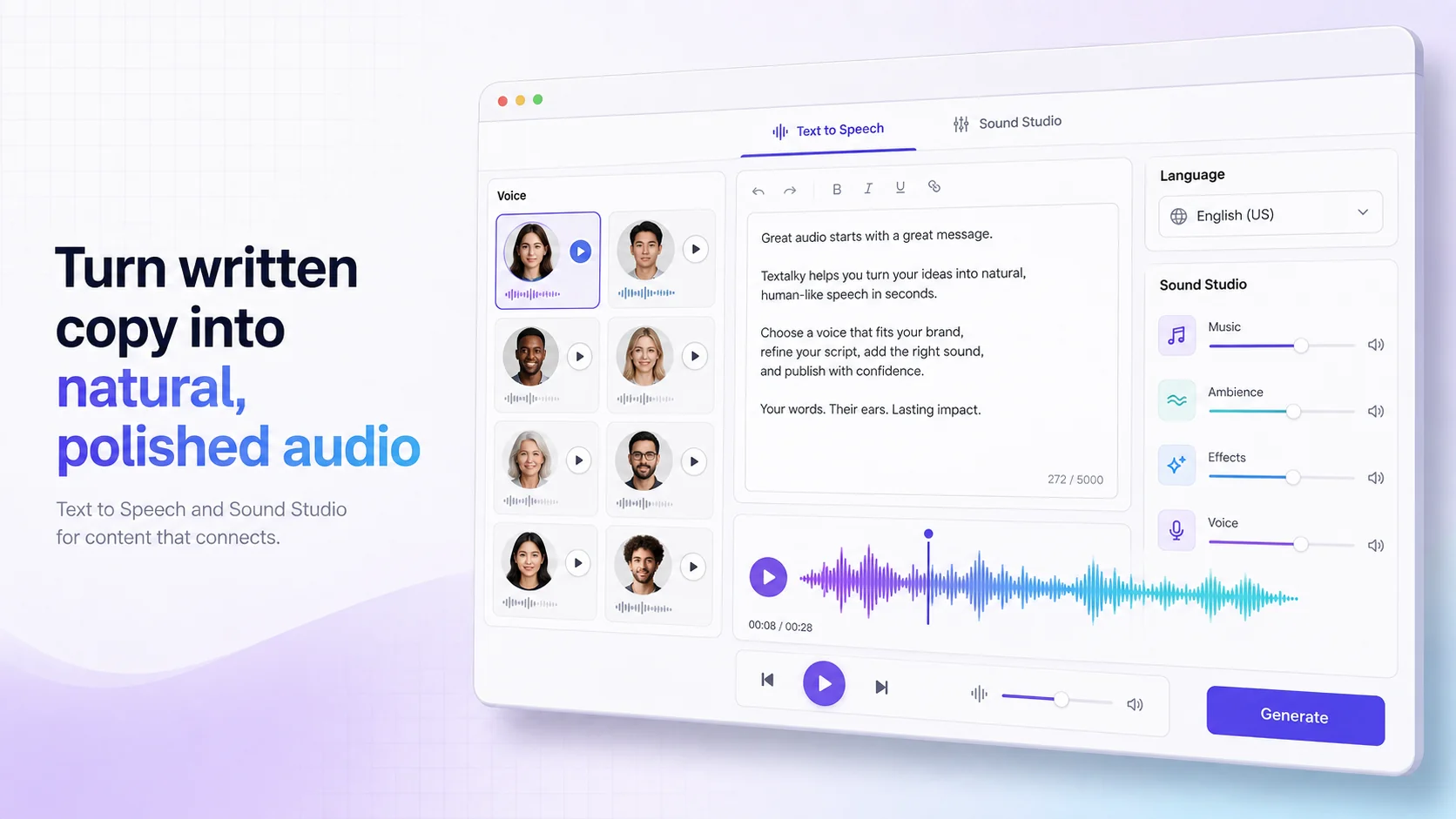
Textalky's AI Voiceover feature stands out as a prime example of modern text to speech technology. Moving beyond the stiff, robotic voices of the past, Textalky leverages advanced AI models to produce remarkably natural and engaging audio.
The core strength of Textalky’s approach is its focus on realism. The AI understands nuances in language, delivering speech that is clear, well-paced, and conveys a sense of natural human intonation. Whether you need a warm, friendly narrator for a marketing video, a clear, authoritative voice for an e-learning module, or a dynamic presenter for a podcast intro, Textalky offers a diverse range of voices to match your project’s specific needs.
With over 150 languages and accents and more than 50 studio-grade voices, Textalky provides the breadth of options necessary for global content creation. This extensive library ensures you can find the perfect vocal match for any project, regardless of its target audience or linguistic requirements.
Crucially, Textalky is not just a standalone TTS tool; it's an all-in-one AI creative studio. This means your AI Voiceover feature is integrated directly with a suite of other powerful AI tools for writing, image generation, video creation, and more. This holistic approach streamlines your entire content creation process, allowing you to generate scripts, create voiceovers, and produce accompanying visuals all within a single, unified interface.
Beyond Basic Narration: Advanced Voice Capabilities
Textalky doesn't stop at basic text-to-speech narration. The platform offers a suite of advanced audio capabilities that elevate your content from simple narration to professional-grade audio production.
- AI Voice Cloning: Imagine being able to replicate your own voice, or the voice of a specific individual, for use in your projects. Textalky’s AI voice cloning allows you to do just that. This feature is invaluable for maintaining brand consistency across multiple audio assets or for creating personalized audio experiences. Once a voice profile is cloned, you can use it to generate new speech from text, ensuring a familiar and consistent vocal presence.
- Voice Isolator: Background noise can significantly degrade the quality of any audio recording. Textalky’s Voice Isolator is designed to remove unwanted ambient sounds, such as background chatter, traffic noise, or echo, from your audio files. This ensures your primary voiceover is crystal clear and free from distractions, making it sound as if it was recorded in a professional studio.
- Sound Studio: For those who require meticulous control over their audio, Textalky’s Sound Studio provides a comprehensive environment for editing, mixing, and mastering. You can combine multiple audio tracks, adjust levels, apply effects, and fine-tune your sound to achieve a polished, professional finish. This integrated studio capability means you don't need to switch between multiple applications to perfect your audio.
These advanced features transform TTS from a simple text-to-audio converter into a powerful component of a complete audio production workflow, empowering creators to achieve studio-quality results.
Integrating Text to Speech into Your Content Workflow
The true value of a robust text to speech tool like Textalky emerges when you see how it integrates into your existing content creation processes. It's not just about generating audio; it's about enhancing and accelerating your entire creative output.
For video creators, TTS can be used to generate voiceovers for explainer videos, marketing advertisements, or YouTube content. You can write your script in Textalky’s AI Writer, refine it with the Smart Editor, then generate a natural-sounding narration using AI Voiceover. This audio can then be easily imported into your video editing software alongside generated AI images or video clips.
Educators and e-learning developers can transform course materials into engaging audio lessons. Narrating e-learning content makes it more accessible and allows learners to study on the go. Textalky's ability to generate clear, consistent narration ensures that complex topics are delivered effectively.
Podcasters can use TTS for intros, outros, segment narration, or even to create full episodes if they lack a consistent co-host or guest. The AI Voiceover can provide a professional opening or closing for your podcast production, and the Sound Studio can help mix in music and sound effects for a polished broadcast.
Marketers can leverage TTS for creating audio versions of blog posts, social media updates, or product descriptions, expanding their reach and engagement across different platforms. The ability to quickly generate and update audio content is a significant advantage in the fast-paced world of digital marketing.
By embedding TTS directly into these workflows, creators can save substantial time and resources, allowing them to focus on the creative aspects of their projects rather than getting bogged down in the technicalities of audio production.
Choosing the Right Plan for Your Needs
Understanding the value Textalky offers is one thing; choosing the right plan to access its powerful features is another. Textalky provides a range of options designed to suit creators at every level, from individuals just starting out to established businesses with high-volume needs. You can explore all the details on the pricing page.
The AI Free plan offers a taste of what Textalky can do, with limited monthly quotas for writing, voiceovers, and visuals. It's a great way to experiment with the tools without any commitment.
For those needing more robust capabilities, the paid plans scale up significantly. The AI Basic plan provides a solid increase in monthly allowances for core features, while the AI Explorer plan unlocks additional tools like AI Avatars, Voice Isolator, and the WordPress integration, making it ideal for creators who need a broader feature set.
The AI Plus and AI Pro plans cater to professionals and larger teams, offering substantial word counts, character limits, visual credits, and advanced features like priority rendering, team seats, and even custom AI models with API access on the Pro tier.
However, for exceptional value, Textalky is currently offering the AI Lifetime Pro, lifetime access for $79 once deal. This one-time payment grants you lifetime access to every tool within the studio, along with generous monthly quotas for writing, voiceovers, transcription, and media credits. This featured offer provides an unparalleled opportunity to access a complete AI creative suite without ongoing subscription fees. It’s a limited-time promotion, so it’s worth checking out the details and making the most of it while it’s available.
Frequently asked questions
What is text to speech online?
Text to speech online, often abbreviated as TTS, is a technology that converts written text into spoken audio. Online TTS tools are web-based applications that allow users to input text via a browser interface and generate audio files, often with a variety of voice options, languages, and customization settings.
How can I make AI voices sound more natural?
To make AI voices sound more natural, look for tools that offer advanced AI models focusing on intonation, emotion, and realistic pacing. Features like adjustable speaking rate, pitch control, and the ability to insert pauses can significantly improve naturalness. Some advanced tools even offer voice cloning to replicate human speech patterns. Textalky's AI Voiceover is designed with these natural qualities in mind.
Can I use AI text to speech for commercial projects?
Yes, AI text to speech tools like Textalky generally allow for commercial use of the generated audio, provided you adhere to their terms of service. This is a key benefit for businesses, marketers, and content creators who need professional voiceovers for revenue-generating projects such as advertisements, e-learning courses, or branded content. Always check the specific licensing terms of the tool you choose.
What is the best text to speech tool for YouTube?
The "best" tool depends on your specific needs, but key factors for YouTube include voice naturalness, a wide range of languages and accents, and ease of integration into your video editing workflow. Tools that offer clear, engaging narration and allow for quick generation and editing are ideal. Textalky's AI Voiceover, combined with its AI Video and AI YouTube tools, makes it a strong contender for YouTube creators looking to enhance their content with professional audio.
Ready to try it yourself?
Create a free Textalky account - no credit card required - and put this into practice.
Start creating for free